
Homepage or landing page: where should your ads lead?
Illustrative AI-generated scene; not a client studio.
Does the destination deliver what your ad promised? Compare a homepage, an existing service page and a campaign landing page with a practical decision tree.
By Karl Belowodski · fieli studio
In 30 seconds
- Choose the destination around the offer and next action, not the name of the page template.
- An existing page may work; a new campaign page adds maintenance as well as flexibility.
- Use the decision tree and follow the contact journey without treating clicks as received inquiries.
“View dates.” Someone taps an ad for a pottery workshop and lands on a beautiful photograph of the studio. Next comes the brand story, followed by pieces for sale. The dates? They are in another menu.
You paid to bring someone to the offer. The link took them to a different subject. Before investing more in promotion, open the destination and check that handoff.
Choosing between a homepage and a landing page starts at that handoff. What does someone expect after tapping, and where can they find it with less searching? You do not automatically need a new page. You do need to deliver on the invitation.
We will follow a workshop from ad to registration, compare three possible destinations and finish with a review you can do on your phone. The workshop, screens and photographs are illustrative. They do not represent a client or a measured conversion test.
“View dates” should open the dates
In the first version, the button opens the studio homepage. That page might look excellent, load quickly and tell a compelling story. It still does not answer the question that brought this visitor there: “When can I take part?”
In the revised version, the link opens the workshop page. The heading confirms the subject. Sessions, duration, location, price and included materials are easy to find. The next button explains how to check or choose a session. The visitor can continue the decision they already started.
The difference is not the label “landing page” in the project brief. It is the sequence invitation → information → action. Google Ads recommends alignment between the ad, its destination and the action offered.1 This is guidance for the experience, not a sales guarantee or a measured result from this workshop.
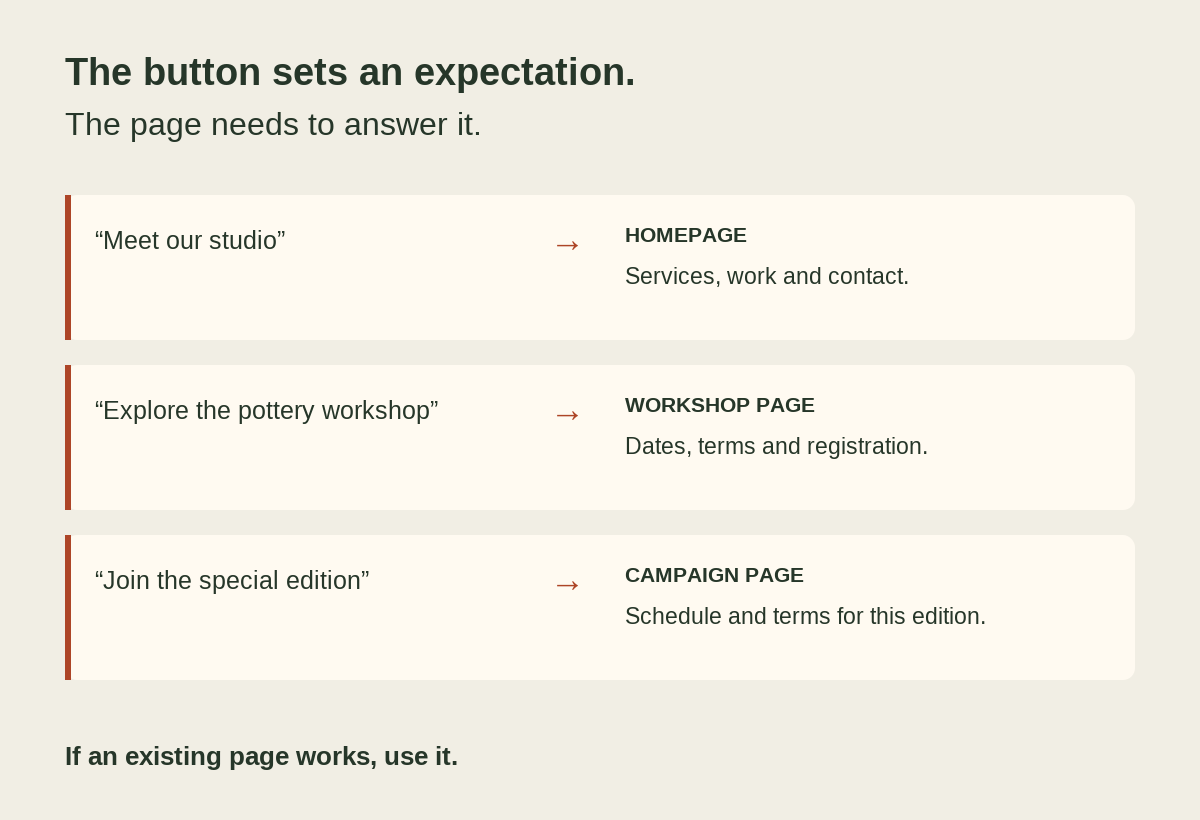
Nielsen Norman Group uses information scent to describe cues that help people predict what a destination contains.2 The practical application here is straightforward: “View dates” creates a more specific expectation than “Meet the studio”. Changing button copy without checking the destination simply moves the problem.
The homepage: when the invitation is to explore the business
An ad may introduce the whole studio: pottery, workshops and commissions. The homepage is then a reasonable candidate. It needs to organize those options and help people choose the relevant path.
Some businesses have just one offer. If the homepage already explains it and provides the next step, it can work as the destination. A page name does not determine its usefulness.
Ask: “Does this visitor still need to choose a subject, or have they already chosen?” Someone arriving from a general introduction may want to explore. Someone who tapped an ad for a Saturday workshop has brought a specific intention. Asking them to choose again between the shop, the story and the workshops may add an unnecessary step.
An existing page: the first place to check
If a workshop page already exists, review it before commissioning another. Is the current edition identified? Are the times still valid? Is the price complete, or are there additional costs? Does registration open the right form? Can the person handling inquiries tell which session the visitor means?
The same principle applies to services elsewhere. A studio advertises product photography; the link opens that service, with scope, authorized work samples and a proposal request. A furniture business promotes a collection; the destination presents that collection. The criterion stays the same.
Use an existing page when it explains the offer properly. Duplicating it creates another address to maintain, another condition that can become outdated and sometimes two conflicting versions of the same information.
A campaign page: when the offer needs its own context
A special workshop edition may have a different schedule, audience, dates and terms. If the current site cannot present that clearly, a dedicated page makes sense. It should provide what people need to decide, rather than enlarging the ad artwork.
For the workshop, that means who it is for, what participants will make, when and where it happens, what is included, the price, relevant rules and how to join. Distinguish an inquiry from confirmed registration. “Ask for information” must not look like a reserved place.
Do not remove business identity and contact details simply to reduce distractions. Do not add unsupported countdowns, testimonials or badges. A specific offer needs reliable information and a working next step.
Plan what happens when the campaign ends, too. Who marks registration as closed? Who updates the ad and page? If another edition exists, the handoff should say so. A link that keeps receiving visits should not imply that an expired offer remains available.
Choose the destination before increasing spend
Use the following guide with a real ad. It organizes a decision; it does not predict conversions.
Choose a destination that fits the invitation
Open an option. No answers are sent or stored.
1. Does the ad introduce the business as a whole?
Yes: review the homepage. Does it explain the business, identify its work and make contact clear? If not, improve that entry point before distribution.
2. Does the ad promote a defined product or service?
Is there already a page explaining the offer and next action?
Yes: review that existing page.
Check scope, terms and contact. Fill any gaps before duplicating the page.
No: prepare a specific destination.
It may be a permanent service page or a campaign page. Is the offer ongoing, or does it have its own dates and terms?
3. Is there a particular class, event, deadline or special set of terms?
Consider a campaign page. Bring together the details for that edition, its action and an owner responsible for updating or closing the offer.
Before choosing any route: Open the link on a phone and follow the advertised action. If the offer is hard to recognize, the destination needs more work.
| Ad invitation | Destination to review | Information needed |
|---|---|---|
| Explore our studio | Homepage | Services, identified work and contact |
| Office organization | Existing service page | Scope, terms and proposal inquiry |
| Join the pottery workshop | Session or campaign page | Dates, syllabus, terms and registration |
Download the ad-to-destination worksheet as a CSV. Use one row per ad and record what needs attention before distribution. No registration is required.
Review it as someone arriving for the first time
Open the ad on your phone and follow the link. Do not start in the website editor: there, you already know where everything is. Read the destination in the order it appears and check five things.
- Recognition: do the heading and first screen confirm the advertised offer?
- Terms: are necessary dates, location, inclusions, restrictions and prices current and accessible?
- Action: does the button describe what actually happens when tapped?
- Journey: do the form, contact route and confirmation work without losing the subject?
- Maintenance: is someone responsible for the next review and for closing the offer?
You do not have to repeat the ad image everywhere. You do have to continue its subject. A photograph of someone shaping clay can open the conversation; the page needs to add the workshop information. From Instagram to the website explores how a brand travels between formats.
Ask someone who was not involved in the project to find a specific detail: “When is the next session?” or “How do I request a proposal?”. Observe without pointing to the right button. This exercise surfaces questions; it does not replace research with a representative audience.
What to monitor after publication
Use consistent UTM parameters to distinguish campaigns and creative in analytics.3 Never put names, phone numbers or other personal data in the link. Record which ad leads to which page and when the offer was reviewed.
Separate a visit, a contact-button tap, a confirmed form submission and a received conversation. Opening WhatsApp does not prove a message was sent. Results also depend on the offer, audience, price and service; do not assign everything to the layout.
When comparing destinations, keep test conditions as similar as possible and record changes. A few visits can reveal failures, but they cannot reliably establish a winner.
Before making another ad, open the one you already have. Can the visitor find what the button promised? The work may start with the link, the content or an existing page. At fieli studio, the project starts by understanding what your customer needs to be able to do.
Five checks before distribution
Use one offer and its actual link.
Recognize the offer
Compare the ad and destination side by side.
How to check Does the heading confirm the same subject?
Check the terms
Review any prices, deadlines and inclusions.
How to check Are they still valid for the current offer?
Follow the action
Test the button and destination without sending a real inquiry.
How to check Does the next step match the button label?
Try it on a phone
Read and navigate at a real mobile screen size.
How to check Are the offer and contact route accessible?
Assign maintenance
Name an owner and next review date.
How to check Who updates the page when the campaign ends?
Frequently asked questions
Does every ad need a new landing page?
No. A homepage or an existing page may work if it matches the offer and lets people take the advertised action.
Can I use a page on my existing website?
Yes. A service or product page can be an appropriate destination. Keep it current and provide a clear next step.
Will a dedicated page guarantee more inquiries?
No. Clarity and functionality support the journey, but the offer, audience, price and response process also affect the outcome.
Sources
- Google Ads — Optimize your ads and landing pages (2026-10-21)
- Nielsen Norman Group — Information Scent (2026-10-21)
- Umami — UTM (2026-10-21)
Updated .
How we made this note: AI-assisted research, every source opened and checked, writing and review by fieli studio.