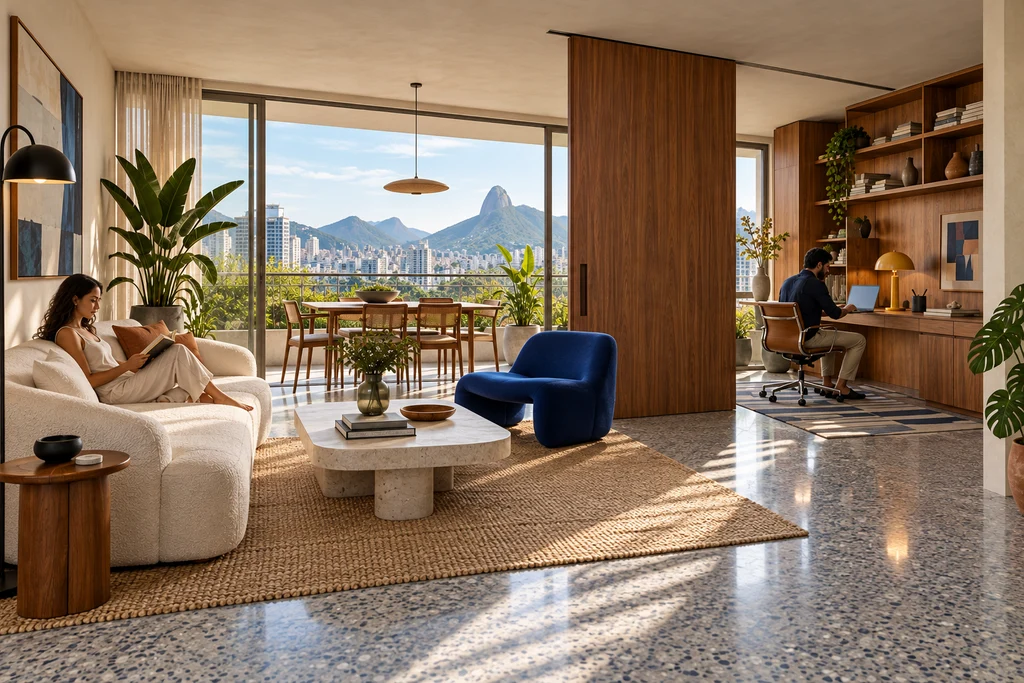
Architecture websites: a portfolio beyond photographs
Fictional visual study created with AI. Not a built work, client project or construction design by fieli studio.
Present architecture projects with a clear brief, design decisions, roles and credits. Explore an editorial example and download the project sheet.
By Karl Belowodski · fieli studio
In 30 seconds
- Explain the requirement, the condition shaping the response and the decision the imagery helps people examine.
- Identify your role, collaborators, credits and project status without presenting concepts as completed work.
- Use the editorial worksheet to build a project page that helps visitors understand the work and take the next step.
You publish the finished living room. A prospective client says it looks beautiful. But did they understand why the circulation changed, what had to stay or which part of the work was yours?
An architect’s website should help visitors understand the project, the professional’s role and the kinds of needs the practice can address. Photographs, drawings and words do different jobs. A precise caption gives people a reason to look again.
The aim is not to turn every page into a complete design report. It is to select the context that changes how the work is understood. ArchDaily’s editorial guide explicitly asks for descriptions of what photographs and drawings cannot show.1 The project sheet below helps you make that selection.
The photograph shows the space. The text can explain the choice
“A contemporary apartment combining sophistication and functionality” could accompany thousands of images. It does not identify the daily routine that informed the design, the constraint that required a choice or the professional’s contribution.
Compare it with a concrete question: did the living room also need to function as a home office? The reader now has something to look for: the desk position, its relationship to the living area, opportunities for separation and the use of light. The text guides attention without requiring architectural vocabulary.
This also avoids asking photography to do an impossible job. A strong image can reveal proportion, atmosphere and spatial relationships. It cannot, by itself, establish the scope of an appointment or explain a negotiated brief. Photographers, architects, construction teams and other collaborators should receive the appropriate credits.
Four questions before writing the page
What was needed? Describe a specific requirement you are authorized to share. “Entertaining and working in the same area” says more than “enhancing the art of living”. Do not expose a family’s identifiable routine merely to make the story interesting.
What shaped the response? This might be retained structure, a relationship to the street, a deadline or the commissioned stage. Select a condition that genuinely helps explain the project. Do not invent a difficulty to make the narrative sound more impressive.
What decision was made? Connect a choice to the requirement. “A movable screen was proposed to adjust the visual separation between living and work” explains an intention. “It guaranteed quiet and productivity” requires evidence that an image cannot provide.
What lets someone observe that decision? Choose an overall view, an authorized drawing or a relevant detail. The material should help the reader examine what the text describes. You do not need to reveal every drawing or publish sensitive technical details.
An editorial example: one room, two uses
The images in this article depict a fictional visual study, created to discuss portfolio communication. They are not a built work, a client project, construction documentation or evidence of measured performance.
In the example, the living area also accommodates work. A timber screen organizes the visual relationship between the two uses. That choice can be explained without inventing floor area, budget, programme or occupants’ satisfaction.
One possible description is:
The same area needed to accommodate living and work. The study proposes a movable screen to adjust the visual separation between them. The images communicate that intention; they do not demonstrate acoustic isolation or construction detailing.
That distinction does not diminish a design. It separates intention, representation and verified outcomes. For a real completed project, the account can develop with the available records: what was built, what changed and what was observed after occupation.

Three references for studying project presentation
For Praça das Artes, Brasil Arquitetura relates the project to the surrounding urban fabric and provides team and image credits. The text helps explain choices that an isolated view cannot.2
In its Neue Nationalgalerie presentation, David Chipperfield Architects explains the balance between conservation and upgrading the museum, alongside drawings and responsibilities. Preserving the appearance did not mean an absence of intervention.3
For Grand Parc, the Lacaton & Vassal page, with Frédéric Druot and Christophe Hutin, connects the transformation to retaining the existing buildings and extending usable space.6
These are public references, not fieli studio projects. The useful question is which information changes how an image is understood? Their scale and design language need not be copied by a practice working in a different context.
Your name is there. Is your role clear?
“Project by practice X” can leave questions when the work involved collaborators, employment at another office or participation in only one stage. Identify the service actually provided and distinguish design authorship, collaboration, construction, photography and visualization. These roles are not interchangeable.
In Brazil, CAU/BR’s guide addresses professional identification, the activity being publicized, clear attribution within collaborative work and consent for publication. Check the guidance applicable to an individual or a practice before publishing.4
On a project page, credits should be readable and associated with that work. A name buried in the general website footer does not establish who did what. State the project’s status too: study, competition, in development, under construction or completed. A visualization should not be presented as a photograph of a built work.
Image permissions deserve their own check. Commissioning a project does not automatically make the client’s information public. Receiving a photograph does not, on its own, define every permitted use.
A project sheet: from your archive to the page
Open the fields below and apply them to work you are allowed to publish. The completed example is fictional. This is an editorial worksheet, not a substitute for professional documentation.
Project presentation sheet
Open each field. The example is fictional; nothing is sent or stored.
Requirement
What needed to happen in the space?
The living area also needed to accommodate a working routine.
Condition
What shaped the response?
Two uses share the same area; their visual relationship needs to be organized.
Decision
Which choice responds to the requirement?
Propose a movable timber screen to adjust visual separation.
Evidence and limits
What can the image show? What does it not demonstrate?
The image shows the relationship between living area, screen and desk. It does not establish acoustic isolation, dimensions or construction detailing.
Role and credits
What was your contribution and who should be credited?
There is no real architect, client or built work in this example: editorial conception by fieli studio with AI-generated imagery. For real work, enter authorship, team, activities, applicable registration details and credits.
Status and publication
What stage is the work at and what can be published?
Fictional visual study. For real work, record status, publication permissions and information review.
Download the project presentation sheet in CSV format. It includes the example and a blank row for your project. No registration is required.
Make the work easy to find, read and follow up
Organize the portfolio around needs your audience can recognize. “Apartment renovation” and “Commercial interiors” may support a search better than internal project names that only the team knows. Use categories that reflect the practice’s actual work; do not invent specialisms to fill a menu.
Each project can have its own URL, with a clear title, concise context, selected imagery, credits and a relevant contact route. On Instagram, introduce a decision that invites interest. On the website, let people investigate the whole project. That handoff should also preserve the identity, as discussed in From Instagram to the website.
For search and accessibility, use HTML images, descriptive alternative text and nearby content that explains the view. Google considers page content and image attributes when understanding an image’s subject.5 This supports careful implementation; it does not guarantee search rankings.
Test the page on a phone. Are captions readable? Do necessary drawings have a screen-appropriate version? Does the contact route clarify which service someone can request? Your own domain is the address of this archive; it does not replace maintenance, backups or updates.
Before publishing the next project, ask someone who was not involved to explain what was needed, what was decided and what your role was. If the page only enables “it looks beautiful”, useful content is still missing. Your website promises quality. What does it show? develops this distinction between claims and evidence.
Five checks before publication
Apply these to a project you are allowed to publish.
Replace an adjective with context
Choose a generic caption and explain the requirement behind the design.
How to check Can a visitor say what needed to be resolved?
Select evidence
Use an overall view and details that help people read the decision.
How to check Do the images support what the text claims?
Name your role
Distinguish authorship, collaboration, construction, photography and visualization.
How to check Do the credits establish who did what?
State the stage
Separate studies, competitions, development, construction and completed work.
How to check Is a visualization correctly identified?
Test the page
Open it on a phone and follow the route to a relevant contact.
How to check Are the text, credits and next action readable and accessible?
Frequently asked questions
Does the website need a complete design report?
No. Select the context needed to understand the project: requirement, condition, decision, your role and material supporting the explanation.
Can I publish work I contributed to at another practice?
Your contribution must be clear and credits and permissions respected. Do not present collective work or another practice’s project as your sole authorship.
Can AI imagery appear in a portfolio?
Identify its conceptual nature and provenance. Do not present it as built work, a real client project or evidence of measured performance.
Does a website replace Instagram?
The channels can serve different purposes: a post introduces one aspect; the website can collect context, projects, services and contact information at your own address.
Sources
- ArchDaily — Guide to Publication (2026-10-21)
- Brasil Arquitetura — Praça das Artes (2026-10-21)
- David Chipperfield Architects — Neue Nationalgalerie refurbishment (2026-10-21)
- CAU/BR — Guia de mídias sociais: pessoa física (2026-10-21)
- Google Search Central — Image SEO best practices (2026-10-21)
- Lacaton & Vassal — Grand Parc (2026-10-21)
Updated .
How we made this note: AI-assisted research, every source opened and checked, writing and review by fieli studio.